
Are you curious whether the PlayStation Portal Remote Player is truly worth the hype or just another accessory? You’re not alone. Gamers are divided — some praise it as a game‑changer while others call it overrated. In this in‑depth guide, I’ll walk you through everything you need to know — from features and real user experience to network tips, limitations, and expert recommendations — so you can decide with confidence.
Here’s what you’ll learn: what the Portal does, how it works, who it’s best for, potential drawbacks, real experiences from users, and whether it’s truly worth buying.
What is the PlayStation Portal Remote Player?
The PlayStation Portal Remote Player is a dedicated handheld device from Sony created solely to stream your PS5 games over Wi‑Fi. It’s not a standalone console — it doesn’t run games natively — instead, it mirrors your PS5 experience right into your hands.
How It Works
- Connects to your PS5 console over Wi‑Fi.
- Streams your game library to an 8″ 1080p display at up to 60fps.
- Features built‑in DualSense controls with haptic feedback and adaptive triggers, just like a real PS5 controller.
In essence, it’s a portable window to your existing PS5 — perfect for when the TV is occupied, or you want to play in another room.
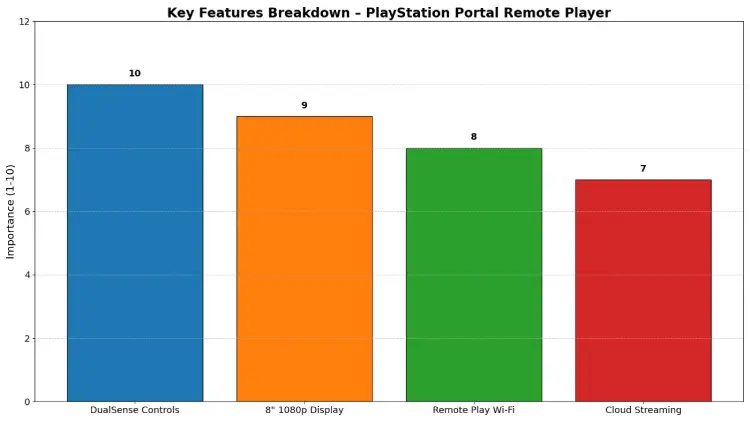
Key Features Breakdown
1. Immersive DualSense Controls
The Portal includes the DualSense controller hardware, not just a touchscreen + Bluetooth pad. That means you get:
- Adaptive triggers that mimic in‑game tension.
- Haptic feedback that responds to actions like driving, walking, or fighting.
This creates a more authentic PS5 feel compared to streaming to a phone with a third‑party controller.
2. Gorgeous Display and Smooth Frame Rates
- Large 8″ LCD screen designed for handheld viewing.
- Full HD at 1080p resolution, capped at 60 frames per second.
- Vibrant visuals make games look great, even next to modern portable rivals.
This is a big step up from squinting at phone screens or small Bluetooth‑controller setups.
3. Remote Play Over Home Wi‑Fi
The Portal connects directly to your PS5 over Wi‑Fi — which means:
- No TV is needed for play anywhere in your house.
- Start playing quickly: power on Portal → connect to PS5 → go.
But here’s the catch: performance depends heavily on your Wi‑Fi quality, which we’ll explore in the next section.
Real Performance: What to Expect
Best Case: Smooth Play
When you have:
- A strong Wi‑Fi (ideally 15 Mbps+),
- PS5 connected via Ethernet or a good home router,
The Portal streams beautifully with low latency and crisp visuals.
This makes couch gaming from the bedroom or even the balcony totally doable.
Network Challenges & Limitations
However, the Portal is not immune to Wi‑Fi issues:
- Without a stable connection, you may see lag, stutter, or input delay.
- Connectivity in public Wi‑Fi spots can be hit or miss.
- Some games may feel less responsive due to small latency.
Multiple gamers on the same network can worsen performance — so prepare for potential tweaks in your router setup.
Cloud Streaming: New Possibilities
In 2025, Sony expanded the Portal’s feature set with major cloud streaming support for PlayStation Plus Premium members.
What That Means
- Play many PS5 titles without your PS5 turned on.
- Access games via cloud libraries and your own purchased content.
This update transforms Portal from a remote console mirror into a more flexible, on‑the‑go handheld experience.
Pros & Cons at a Glance
Here’s an honest look at the good and the not‑so‑good:
Pros
- True DualSense controller experience in handheld form.
- Bright, smooth 1080p/60fps streaming.
- Great for households sharing TVs.
- Cloud streaming adds flexibility (Premium users).
Cons
- Network‑dependent performance — not great without high‑speed Wi‑Fi.
- No Bluetooth audio — wired or proprietary PlayStation Link only.
- No standalone game installs — must stream.
- Some users experience input lag or stuttering.
Who Is PlayStation Portal Best For?
Perfect For
- PS5 owners only — Portal cannot run games by itself.
- Gamers who want to play anywhere without occupying the main TV.
- Those with reliable home Wi‑Fi or cloud access.
Not Ideal For
- People with weak or unstable internet.
- Gamers are expecting a standalone console like a Switch or Steam Deck.
- Those who want local multiplayer or Bluetooth accessories.
Tips to Improve PlayStation Portal Experience
Here’s what I’ve found helps the most:
- Use Ethernet backhaul for your PS5 – increases stability.
- Prioritise 5 GHz Wi‑Fi for Portal traffic.
- Test your PS Remote Play app first — if phone streaming works, Portal will too.
- Consider upgrading the internet if you notice lag.
These steps will significantly reduce common issues.
Verdict: Is It Worth Buying?
After reviewing specs, user feedback, and real performance insights:
Yes — but only if you’re a PS5 owner with good Wi‑Fi and want a dedicated handheld experience.
Not recommended as a standalone gaming device — it only streams games.
Great value if you want a portable way to play PS5 titles around the home or via cloud.
It’s more accessory than independent console, but in my experience, it delivers fantastic remote play immersion — when conditions are right.
Related Products & Alternatives
- Standard PS5 Remote Play App (free on phones/tablets)
- Portable gaming like Steam Deck / Switch for local play
- Cloud gaming services (if you want console access anywhere)
Choosing the right tool depends on how and where you want to game.
Conclusion
The PlayStation Portal Remote Player is an incredible portable accessory that brings PS5 gaming right into your hands — with the DualSense experience intact. It shines in households with shared TVs and for gamers who want flexibility without buying a second console. However, its reliance on strong Wi‑Fi and lack of Bluetooth or standalone hardware means it’s not for everyone.
Key takeaways:
- Portable PS5 streaming device (not a console).
- Immersive DualSense experience built in.
- Performance varies with Wi‑Fi quality.
- Cloud streaming expands usefulness.
Ready to decide? Comment below with your questions or share your own Portal experience — I’d love to hear what you think!
Frequently Asked Questions
Q1: What is the PlayStation Portal Remote Player?
A1: It’s a handheld device by Sony that streams your PS5 games over Wi‑Fi to an 8″ screen using built‑in DualSense controls.
Q2: Do I need a PS5 to use the Portal?
A2: Yes — you need a PS5 console, home Wi‑Fi, and a PlayStation account to stream games.
Q3: Can the Portal play games without internet?
A3: No — Portal streams games. Without Wi‑Fi or cloud access, it cannot run games locally.
Q4: Is the Portal better than PS Remote Play on a phone?
A4: Many users report better stability and comfort due to the dedicated hardware, though experiences vary.
Q5: Does the Portal support cloud streaming?
A5: Yes, with a PlayStation Plus Premium subscription,n you can stream select PS5 titles from the cloud.
