
How to Corrupt PS1 BIOS PlayStation 1 BIOS corruption represents a specialized technique employed by experienced users seeking to generate system glitches, evaluate emulator performance, or investigate console responses to compromised system code. This practice has gained traction within specialized communities dedicated to reverse engineering, speedrunning optimization, and homebrew development.
This comprehensive guide examines methods for safely corrupting PS1 BIOS files through emulation environments. By employing appropriate tools and maintaining proper precautions, enthusiasts can conduct experiments without compromising physical hardware or risking data loss.
Disclaimer and Legal Warning
BIOS corruption experiments must exclusively utilize backup copies—never modify original files. Corrupted BIOS files should never facilitate piracy or enable deceptive software manipulation. These procedures serve purely educational and experimental objective
Why Do People Corrupt PS1 BIOS?
While deliberately damaging PlayStation 1 BIOS files may seem counterintuitive, developers, modders, and dedicated enthusiasts pursue this practice for several compelling reasons:
1. Learning How the System Works
Intentionally compromising BIOS segments allows technically proficient users to observe PS1 system responses. This methodology reveals error handling mechanisms, startup procedures, and general operational behavior. The approach functions as comprehensive stress testing—pushing system boundaries to document behavioral patterns. Emulator developers leverage these techniques to identify bugs and ensure their software accurately replicates authentic PS1 behavior, even during anomalous conditions.
2. Glitch Art and Cool Visuals
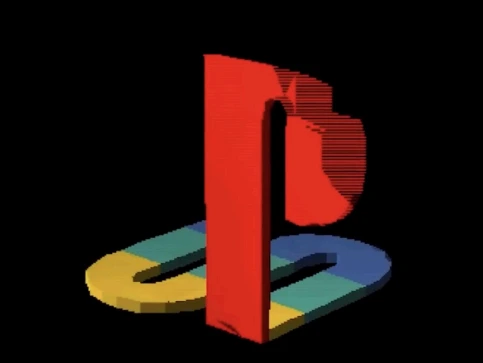
Certain users corrupt BIOS files purely for entertainment or artistic expression—a practice known as glitch art. Corrupted BIOS files can produce striking visual anomalies: psychedelic color palettes, warped logos, or bizarre audio during system initialization. These dramatic effects transform standard PS1 startup sequences into captivating digital spectacles. Enthusiasts frequently showcase these creative corruptions online with titles like “PlayStation Annihilation” or “BIOS Corruption Art.”

3. Speedrunning Tricks
Speedrunners—competitors attempting rapid game completion—analyze BIOS functionality to uncover hidden glitches or shortcuts. While they typically avoid direct BIOS corruption during gameplay, understanding system architecture helps them trigger game-breaking exploits or discover accelerated completion routes. This represents strategic application of deep PS1 knowledge for competitive advantage.
4. Homebrew and Emulator Development
Technical users employ BIOS corruption for PlayStation 1 reverse engineering. Monitoring system failures and responses helps identify specific BIOS functions. This knowledge proves invaluable for developing homebrew applications, custom software, or emulators requiring precise PS1 replication.
Tools Needed to Corrupt a PS1 BIOS
Essential equipment includes:
These applications enable direct manipulation of BIOS file raw data.
How to Corrupt PS1 BIOS (Step-by-Step)
PS1 BIOS corruption involves modifying file data through hex editors or specialized corruption software. The following methodology outlines a secure, straightforward process. Remember: always work with copies and preserve original files.
Step 1: Back Up the Original BIOS
Initially, create a secure copy of your original BIOS file. Rename it descriptively, such as scph1001_backup.bin. This backup serves as your restoration point, guaranteeing you can return to functional BIOS if experiments fail.
Step 2: Choose the Right Tool
Select a hex editor for accessing and modifying BIOS binary data. Recommended options:
Download and install the appropriate version for your operating system.
Step 3: Open the BIOS in the Hex Editor
Launch your copied BIOS file (e.g., scph1001.bin) within the hex editor. The interface displays hexadecimal value rows (like 00 FF 4D 2C) on the left, with corresponding ASCII text on the right. Each numerical group controls specific PlayStation operational aspects.
Step 4: Edit a Small Part of the BIOS
Navigate to a middle file section. Avoid modifying initial rows, as these typically contain critical boot instructions that may cause immediate, irreversible crashes. After selecting an appropriate section, implement small, intentional modifications. Examples include:
- Altering sequences like 3C 00 12 to FF FF FF
- Randomly repositioning several bytes within one row
Important: Limit changes to 3-6 bytes per session. Excessive data corruption can render files completely unreadable, preventing meaningful effect observation. The objective involves introducing subtle modifications to document specific reactions, not completely destroying file integrity.
Step 5: Save the Corrupted BIOS File
Select “Save As” and rename your modified file descriptively: scph1001_corrupt.bin
This preserves your original while enabling multiple version testing.
Step 6: Load the Corrupted BIOS in an Emulator
Test your corrupted BIOS by launching your preferred PS1 emulator (RetroPie, ePSXe, DuckStation). Access emulator BIOS settings and specify your corrupted BIOS file. Attempt launching a game or accessing the emulator’s BIOS interface. Observe various potential outcomes:
- Corrupted or frozen logos
- System crashes or blank screens
- Distorted audio effects or control malfunctions
- Boot loops or cryptic error displays
Each corruption typically produces unique results—part of the experimental appeal!
Step 7: Log What You Changed
Maintain a detailed text log documenting:
- Which bytes you modified
- Location details (offset/line numbers)
- Testing results obtained
This documentation enables result replication or future adjustment refinement.
Important Safety Tips
Emulators Only: Test corrupted BIOS files exclusively within emulation environments. Never attempt flashing or implementing corrupted BIOS on original PS1 hardware—this risks permanent console damage.
Backup, Backup, Backup: Maintain multiple backups of original, uncorrupted BIOS files.
What Happens When BIOS is Corrupted?
Version Control: Employ clear, descriptive filenames with version identifiers (e.g., v1_corrupt.bin, v2_corrupt.bin) for organized file management.
Corrupted PS1 BIOS prevents proper instruction processing. This generates various glitches, crashes, or boot failures. Results depend on which BIOS sections were modified and corruption severity levels.
Common Emulator Reactions to a Corrupted BIOS
Testing corrupted BIOS files in emulators like RetroPie, DuckStation, or ePSXe may produce these effects:
- Black Screen at Startup: Emulators may freeze immediately without displaying PlayStation logos.
- Distorted Sony Boot Logo: The iconic white PlayStation logo might appear with incorrect colors, distorted proportions, or flickering patterns.
- Glitched Sounds: Startup audio or menu music may sound corrupted, decelerated, or replaced by digital noise.
- Controller Not Responding: Input functionality may cease if I/O handling sections were corrupted.
- Game Crashes or Refusal to Load: Games may crash during initialization, fail loading, or exhibit unpredictable menu behavior.
- Boot Loop: Emulators may continuously restart if startup verification fails.
These effects remain safely contained within emulation environments. Real hardware may experience more severe consequences.
Hardware vs Software Behavior
In emulators:
Corrupted BIOS typically fails execution, with emulators displaying error messages or ceasing operation. Emulation software provides protective isolation, preventing computer damage.
On actual PS1 hardware
Implementing corrupted BIOS on physical PlayStation 1 consoles risks severe consequences. Systems may lose video output, shut down unexpectedly, or become permanently inoperable. Physical hardware corruption remains strongly discouraged.
Always conduct BIOS experiments within software environments. Never flash corrupted BIOS to physical hardware.
Conclusion
PS1 BIOS corruption enables controlled system behavior exploration through safe emulation environments. Always maintain original BIOS backups and avoid real hardware testing. Employ clear documentation and reversible methodologies for tracking modifications. This process serves learning and glitch research purposes, not console destruction. Maintain legal compliance, experiment responsibly, and contribute findings to the community.
