
Do you miss the golden era of PlayStation 2 gaming? Imagine playing your favourite PS2 classics on modern devices without dusting off your old console. A PS2 emulator makes this possible, letting you relive nostalgia with enhanced graphics, save states, and performance tweaks. In this guide, you’ll learn about the top PS2 emulators, setup instructions, optimisation tips, and legal precautions to play safely and effectively.
What Is a PS2 Emulator?
A PS2 emulator is software that replicates the PlayStation 2 console on PCs, Android devices, or macOS, allowing you to play PS2 games without the original hardware.
How PS2 Emulators Work
Emulators translate PS2 game code into commands your device understands. They replicate graphics, sound, and gameplay mechanics, giving a virtual console experience. With proper settings, you can achieve better graphics than the original console.
Why You Should Use One
- Improved visuals: High-resolution upscaling, anti-aliasing, and widescreen support
- Save states: Save anytime without relying on in-game checkpoints
- Portability: Carry PS2 games on your phone or laptop
- Customisation: Map controls, tweak graphics, and optimise performance
Limitations to Keep in Mind
- Some games may lag or glitch
- Requires BIOS files for functionality (legal caution below)
- Advanced settings may confuse beginners
Top PS2 Emulators in 2026
PCSX2 — Best Overall Emulator
Platforms: Windows, Mac, Linux
PCSX2 is the most popular and stable PS2 emulator, known for high game compatibility and advanced features.
Features:
- Excellent support for most PS2 titles
- Controller customisation (DualShock/Xbox)
- Graphics enhancements: upscaling, anti-aliasing, texture filtering
- Active community for support and updates
In my experience, PCSX2 runs classics like God of War and Shadow of the Colossus flawlessly with proper tweaks.
RetroArch with PS2 Core
Platforms: PC, Android, macOS
RetroArch is a multi-emulator frontend, supporting PS2 via the LRPS2 core.
Pros:
- Multi-console support
- Save and rewind features
- Centralised game management
Cons:
- The setup is complex for beginners
- May need performance tuning per game
AetherSX2 — Best for Android
Platform: Android
Designed for mobile, AetherSX2 offers excellent performance on modern phones.
Benefits:
- Intuitive mobile controls
- Hardware-accelerated graphics
- Saves and load states
Ideal to play at home or on the move, and not be compromised.
NetherSX2 — Lightweight and Beginner-Friendly
Platforms: PC, Android
Why it’s trending:
- Runs well on mid-range hardware
- Simple interface, great for newcomers
- Good game compatibility
Play! — Simple Emulator for Casual Users
Platforms: PC, Android, iOS
Play! prioritises simplicity over features. It’s easier to use but supports fewer games and customisation options.
How to Install a PS2 Emulator Safely
Legal Disclaimer: Emulators themselves are legal. Downloading BIOS files or game ROMs you don’t own may violate copyright laws. Always use your own PS2 BIOS and legally purchased games.
Step 1: Download Emulator
- Visit the official site
- Choose the correct platform (PC or Android)
- Scan downloaded files with antivirus software
Step 2: Obtain PS2 BIOS
A BIOS file is mandatory to run games. Legally, you should dump it from your own console. Avoid downloading BIOS from unknown sources.
Step 3: Load Your Game
- PS2 games come as ISO files or discs
- Load ISO via emulator (File > Open)
Step 4: Configure Settings
Graphics:
- Renderer: Vulkan or OpenGL
- Resolution: 2x or 3x native
Controls:
- Map your controller
- Set presets for each game
Audio:
- Usually, the default settings are fine
Optimizing Performance
Graphics Enhancements
- Upscaling: Makes old graphics sharp
- Anti-aliasing: Smooths jagged edges
- Texture filtering: Enhances visual quality
Speed Hacks
PCSX2 and other emulators have speed hacks:
- Enable multi-threading
- Adjust internal resolution
- Reduce extra graphics effects on low-end devices
Controller Tips
- Use USB or Bluetooth controllers
- Map buttons for comfort
- Save game-specific presets
Game Compatibility Guide
Games That Run Exceptionally Well
- Shadow of the Colossus
- Grand Theft Auto: San Andreas
- Kingdom Hearts series
- Final Fantasy X
- God of War 1 & 2
Games With Issues
- Persona 4 (audio sync problems)
- Bully (performance drops)
- Tekken Tag Tournament (slowdowns)
Always check emulator forums for game-specific settings to fix glitches.
Common Problems and Fixes
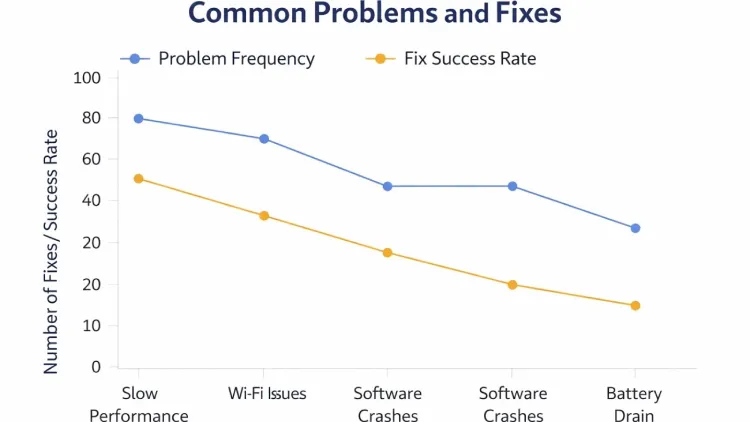
Even with the best PS2 emulators, you might encounter issues. Here are some common problems and practical fixes I’ve found helpful:
Game Won’t Start
If your game refuses to launch:
- Verify BIOS file – Make sure you are using a legitimate PS2 BIOS dumped from your own console. Without it, most emulators won’t run games.
- Check ISO integrity – Damaged or incomplete game files can prevent the emulator from starting. Try re-downloading or using a different copy.
- Update emulator – Developers often fix bugs and improve compatibility in newer versions. Running an outdated emulator can block certain games.
Tip: Sometimes running the emulator as an administrator helps on Windows PCs.
No Sound
Audio problems are common but usually easy to fix:
- Switch audio plugin – Many emulators let you choose between different sound drivers. Changing this can restore sound.
- Use a different renderer – Some games experience audio issues depending on the graphics renderer. Switching from OpenGL to Vulkan (or vice versa) often solves the problem.
- Check volume settings – Confirm that in-game and system audio are not muted or too low.
Tip: Restart the emulator after making audio changes to ensure settings take effect.
Lag or Slowdowns
Performance issues can ruin the gaming experience. Here’s how to improve speed:
- Lower resolution – Reducing the internal resolution can significantly boost FPS, especially on older hardware.
- Disable extra graphics filters – Effects like anti-aliasing or texture enhancements can slow down gameplay on mid-range devices.
- Upgrade hardware if needed – A faster CPU, GPU, or more RAM can drastically improve performance for demanding PS2 games.
- Close background apps – Freeing up system resources ensures the emulator runs smoothly.
Tip: On PCSX2, enabling the MTVU (multi-threading) option can also give a noticeable performance boost for modern multi-core processors.
Other Helpful Fixes
- Game-specific patches – Some titles have community patches to fix glitches or improve performance.
- Controller issues – Make sure your controller is mapped correctly, and test different USB or Bluetooth devices if buttons aren’t responsive.
- Frequent crashes – If a game keeps crashing, try resetting the emulator settings to default, then tweak gradually.
Personal Tips From My Experience
From my experience using PS2 emulators, a few simple steps make a big difference in gameplay quality:
- Always back up save files – Protect your progress from crashes or accidental deletion.
- Keep your emulator updated – Updates fix bugs and improve game compatibility.
- Join online communities – Forums and Reddit provide tips, fixes, and settings from experienced users.
- Use the Vulkan renderer – It usually delivers smoother graphics and better performance.
- Customise controls – Map buttons for comfort and save profiles for each game.
Even small actions like these can turn frustrating emulation into a smooth, enjoyable gaming experience.
Conclusion
A PS2 emulator lets you relive PlayStation 2 classics on modern devices with better graphics, save states, and enhanced performance. Whether you choose PCSX2, AetherSX2, or RetroArch, proper setup, BIOS usage, and performance tweaks are crucial. Explore communities for fixes, optimise settings, and always play legally. Ready to revisit your favourite PS2 games? Start your emulator journey today and experience retro gaming like never before!
Frequently Asked Questions
Q1: What is a PS2 emulator?
PS2 emulator is software that mimics the PlayStation 2 console, allowing you to play PS2 games on PC, Android, or other devices.
Q2: Is using a PS2 emulator legal?
The emulator itself is legal. Downloading BIOS or ROMs of games you don’t own may violate copyright laws.
Q3: Which PS2 emulator is best?
For PC, PCSX2 is the most stable. For Android, AetherSX2 offers excellent mobile performance.
Q4Can I play all PS2 games on an emulator?
Most popular games work well, but some may have glitches.
