
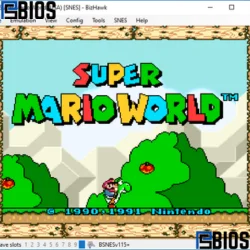
BizHawk is a powerful, accuracy-focused multi-system emulator designed for retro gaming and tool-assisted speedruns. It supports classic consoles like NES, SNES, Game Boy, and PlayStation 1 while offering advanced features like frame control, scripting, and rewind. Although BizHawk does not support modern systems like PS2 or 3DS, it remains one of the most reliable and precise emulators for serious gamers, developers, and speedrunners.
What is BizHawk Emulator?
BizHawk is a multi-platform emulator that allows users to play games from multiple retro consoles on a single system. Unlike many standard emulators, BizHawk is built with a strong focus on accuracy and reproducibility, making it a favorite among advanced users.
At its core, BizHawk is not just about playing games—it is about controlling, analyzing, and perfecting gameplay. It is widely used in the speedrunning community, where every frame matters.
One reason BizHawk has gained popularity is its deterministic behavior. This means that if you input the same commands, the emulator will produce the same result every time. This level of precision is essential for TAS (Tool-Assisted Speedruns).
BizHawk supports a wide range of classic gaming systems, including:
- Nintendo Entertainment System (NES)
- Super Nintendo (SNES)
- Game Boy and Game Boy Advance
- Sega Genesis
- PlayStation 1
- Atari systems
Because of this versatility, BizHawk eliminates the need to install multiple emulators for different consoles.
Key Features of BizHawk
BizHawk stands out for its powerful, advanced features. It is not just a basic emulator—it is a professional-level tool for retro gaming.
1. Multi-System Emulation
BizHawk allows you to run multiple console systems from one platform. This saves time and provides a unified experience.
2. Tool-Assisted Speedrun (TAS) Tools
This is where BizHawk truly shines. TAS tools include:
- Frame-by-frame control
- Input recording and playback
- Rewind and fast-forward
- Precise timing tools
These features allow players to perfect gameplay and achieve results impossible in real-time play.
3. Lua Scripting Support
BizHawk includes Lua scripting, which enables:
- Automation of gameplay
- Custom debugging tools
- Game testing and analysis
This makes it extremely useful for developers and advanced users.
4. Save States and Rewind
You can save your progress at any moment and return to it instantly. The rewind feature allows you to correct mistakes without restarting the game.
5. High Accuracy Emulation
BizHawk prioritizes accuracy over raw performance. Games behave exactly as they did on original hardware.
6. Controller Support
Supports keyboard, gamepads, and custom input setups for flexible control.
Is BizHawk an Emulator?
Yes, BizHawk is a fully functional emulator. It mimics the hardware of older gaming consoles, allowing games designed for those systems to run on modern computers.
Unlike simple emulators, BizHawk provides advanced debugging and scripting features. This makes it more than just a gaming tool—it is also used for research and development.
Is BizHawk Better Than Other Emulators?
The answer depends on what you need.
BizHawk is better in terms of:
- Accuracy
- TAS tools
- Debugging capabilities
However, it may not be the best choice if you want:
- A beginner-friendly interface
- Support for modern consoles
- High-end graphical enhancements
Compared to other emulators, BizHawk is more technical but also more powerful. It is often considered one of the best emulators for serious users.
Supported Systems and Limitations
BizHawk supports many classic gaming systems, but has clear limitations.
Supported Systems
- NES, SNES
- Game Boy, GBA
- Sega Genesis
- PlayStation 1
- Atari consoles
Unsupported Systems
BizHawk does not support:
- PlayStation 2
- Nintendo 3DS
- Modern Android games
Because of this, BizHawk cannot run PS2 or 3DS games. It is designed strictly for retro gaming.
Can BizHawk Play PS2 Games or 3DS Games?
No, BizHawk cannot play PS2 or Nintendo 3DS games.
PS2 emulation requires powerful hardware and specialized software. Similarly, 3DS emulation is complex and requires dedicated emulators.
BizHawk focuses on older systems where it can deliver high accuracy and stable performance.
Performance and System Requirements
BizHawk is lightweight compared to modern emulators.
Minimum Requirements
- 2–4 GB RAM
- Dual-core processor
- Basic GPU
- Windows OS
For comparison, PS2 emulators typically require:
- 4–8 GB RAM
- Strong CPU and GPU
BizHawk runs smoothly even on low-end PCs because it emulates older hardware.
How Much RAM is Needed for PS2 Emulation?
Although BizHawk does not support PS2, understanding requirements helps users compare.
PS2 emulation usually needs:
- Minimum: 4 GB RAM
- Recommended: 8 GB or more
In contrast, BizHawk works efficiently with much less memory.
Graphics and Resolution Explained
Retro consoles had lower resolutions compared to modern systems.
- Older consoles → around 240p
- Later systems like PS1 → around 480p
BizHawk maintains original resolution accuracy while allowing optional enhancements like scaling and filters.
Is BizHawk Safe to Use?
Yes, BizHawk is safe when downloaded from official or trusted sources.
To ensure safety:
- Avoid unofficial downloads
- Use antivirus software
- Do not install modified versions
The emulator itself is clean and secure.
Is BizHawk Legal
BizHawk is completely legal.
However, legality depends on game files:
- Legal → Games you own
- Illegal → Pirated ROM downloads
The emulator is just a tool; how you use it determines legality.
Can BizHawk Play Arcade Games
BizHawk has limited support for arcade systems.
While it can run some arcade games, it is not the best choice for full arcade emulation. Dedicated arcade emulators are better suited for that purpose.
Can BizHawk Run 3DS Games?
No, BizHawk cannot run 3DS games. It is not designed for modern handheld systems.
3DS emulation requires a different architecture and higher system performance.
PS1 Emulation in BizHawk
BizHawk supports PlayStation 1 emulation very well.
Features include:
- Stable gameplay
- Save states
- Input recording
- High compatibility
This makes BizHawk a great choice for classic PS1 games.
Which Emulator Gives High FPS
FPS (frames per second) depends on:
- Emulator optimization
- Hardware power
- Game complexity
BizHawk focuses on accuracy rather than maximizing FPS. However, for retro systems, it still provides smooth and stable performance.
Which Emulator is the Safest?
The safest emulator is one that:
- Is open-source or well-known
- Has a strong community
- Is downloaded from official sources
BizHawk is considered safe due to its reputation and active development.
Android Gaming vs Emulation
BizHawk is not designed for Android apps or games.
Modern Android gaming uses different platforms. Some Android games reach billions of downloads, showing how popular mobile gaming has become.
However, retro emulation remains popular due to nostalgia and classic gameplay.
Is Running an Emulator Illegal?
Running an emulator is not illegal.
The legality depends on the games:
- Legal → If you own the original copy
- Illegal → If you download pirated versions
This applies to all emulators, including BizHawk.
Game Compatibility and Accuracy
BizHawk offers excellent compatibility for supported systems.
Advantages
- Accurate gameplay
- Minimal bugs
- Reliable performance
Limitations
- No modern console support
- Limited arcade support
Why Many Gamers Don’t Finish Games
Studies show many players never complete games.
Common reasons:
- Time constraints
- Difficulty spikes
- Loss of interest
BizHawk helps solve this with:
- Save states
- Rewind features
- Practice tools
PS2 and Gaming Facts
Even though BizHawk does not support PS2, here are key insights:
- PS2 games typically run at 480p
- Some consoles can overheat over time
- Early hardware models had limitations
Can You Emulate PS1 Games?
Yes, PS1 games can be emulated, and BizHawk supports them.
This allows players to enjoy classic titles without original hardware.
Best Use Cases for BizHawk
BizHawk is perfect for:
- Retro gaming
- Speedrunning
- Game testing
- Content creation
It is not ideal for modern AAA gaming or Android apps.
Pros and Cons of BizHawk
Pros
- High accuracy
- Advanced tools
- Multi-system support
- Lightweight
Cons
- Not beginner-friendly
- No support for modern consoles
- Limited arcade compatibility
Conclusion
BizHawk is one of the most powerful retro emulators available today. While it does not support modern systems like PS2 or 3DS, it excels in accuracy, stability, and advanced features.
If your goal is precision and control, BizHawk is an excellent choice. It remains a top option for serious gamers, speedrunners, and developers.
